
4.2. tools#
- lmd.tools.ellipse(major_axis: float, minor_axis: float, offset: ndarray = array([0, 0]), rotation: float = 0, polygon_resolution: float = 1) Shape#
Get a lmd.lib.Shape for ellipse of choosen dimensions.
- Parameters:
major_axis – Major axis of the ellipse. The major axis is defined from the center to the perimeter and therefore half the diameter. The major axis is placed along the x-axis before rotation.
minor_axis – Minor axis of the ellipse. The minor axis is defined from the center to the perimeter and therefore half the diameter. The minor axis is placed along the y-axis before rotation.
offset – Location of the ellipse based on the center given in the form of (x, y). Defaults to no offset.
rotation – Clockwise rotation in radian.
polygon_resolution – The polygon resolution defines how far the vertices should be spaced on average. A polygon_resolution of 10 will place a vertex on average every ten units.
- Returns:
Shape which contains the ellipse.
Example
import numpy as np
from lmd.lib import Collection, Shape
from lmd import tools

calibration = np.array([[0, 0], [0, 100], [50, 50]])
my_first_collection = Collection(calibration_points=calibration)

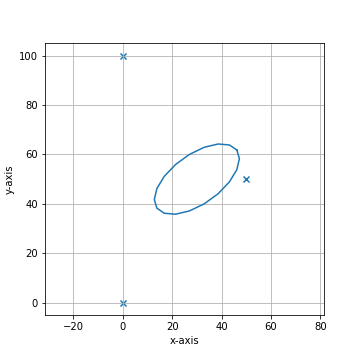
my_ellipse = tools.ellipse(20, 10, offset=(30, 50), polygon_resolution=5, rotation=1.8 * np.pi)
my_first_collection.add_shape(my_ellipse)
my_first_collection.plot(calibration=True)
- lmd.tools.glyph(glyph: str, offset: ndarray = array([0, 0]), rotation: float = 0, divisor: int = 3, multiplier: float = 1, **kwargs) Collection#
Get an uncalibrated lmd.lib.Collection for a glyph of interest.
- Parameters:
glyph – Single glyph as string.
offset – Location of the glyph based on the top left corner. Defaults to no offset.
rotation – Rotation of glyph in radians
divisor – Parameter which determines the resolution when creating a polygon from a SVG. A larger divisor will lead to fewer datapoints for the glyph.
multiplier – Scaling parameter for defining the size of the glyph. The default height of a glyph is 10 units.
- Returns:
Uncalibrated Collection which contains the Shapes for the glyph.
- Return type:
- lmd.tools.glyph_path(glyph: str) Path#
Returns the path for a glyph of interest. Raises a NotImplementedError if an unknown glyph is requested.
- Parameters:
glyph – Single glyph as string.
- Returns:
Path for the glyph.
- Return type:
str
- lmd.tools.makeCross(center: ndarray, arms: ndarray, width: float, dist: float) Collection#
Generate lmd.lib.Shapes to represent a crosshair and add them to an exisiting lmd.lib.Collection.
Notes
Deprecated and will be removed in version 2.0.0. Use
lmd.tools.make_cross()instead.See also
- lmd.tools.make_cross(center: ndarray, arms: ndarray, width: float, dist: float) Collection#
Generate lmd.lib.Shapes to represent a crosshair and add them to an exisiting lmd.lib.Collection.
- Parameters:
center – center of the new crosshair
arms – length of the individual arms [top, right, bottom, left]
width – width of each individual element of the crosshair
dist – Controls the gap between the center dot and the arms. The inner edge of each arm sits at a distance of
2 * distfrom the center, so larger values spread the arms further out.
- Returns:
Uncalibrated Collection which contains the Shapes for the calibration cross.
Example
import numpy as np
from lmd.lib import Collection, Shape
from lmd import tools

calibration = np.array([[0, 0], [0, 100], [50, 50]])
my_first_collection = Collection(calibration_points=calibration)

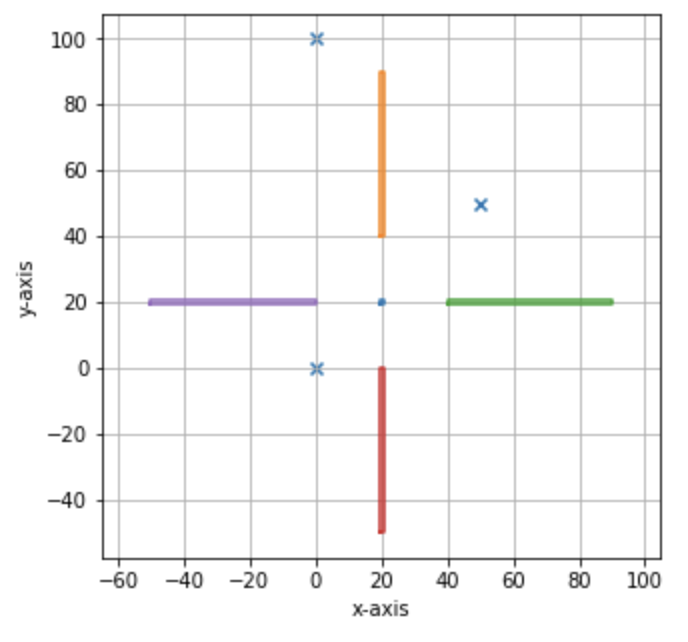
cross_1 = tools.make_cross([20, 20], [50, 50, 50, 50], 1, 10)
my_first_collection.join(cross_1)
my_first_collection.plot(calibration=True)
- lmd.tools.rectangle(width: float, height: float, offset: ndarray = array([0, 0]), rotation: float = 0, rotation_offset: ndarray = array([0, 0])) Shape#
Get a lmd.lib.Shape for rectangle of choosen dimensions.
- Parameters:
width – Width of the rectangle.
height – Height of the rectangle.
offset – Location of the rectangle based on the center. Defaults to no offset
rotation – Rotation in radian.
rotation_offset – Location of the center of rotation relative to the center of the rectangle. Defaults to no offset.
- Returns:
Shape which contains the rectangle.
Example:
- lmd.tools.text(text: str, offset: ndarray = array([0, 0]), divisor: int = 3, multiplier: float = 1, rotation: float = 0, **kwargs) Collection#
Get an uncalibrated lmd.lib.Collection for a text.
- Parameters:
text – Text as string.
offset – Location of the text based on the top left corner. Defaults to no offset.
divisor – Parameter which determines the resolution when creating a polygon from a SVG. A larger divisor will lead to fewer datapoints for the glyph.
multiplier – Scaling parameter for defining the size of the text. The default height of a glyph is 10 units.
rotation – Rotation of glyph in radians
- Returns:
Uncalibrated Collection which contains the Shapes for the text.
Example
import numpy as np
from lmd.lib import Collection, Shape
from lmd import tools

calibration = np.array([[0, 0], [0, 100], [100, 50]])
my_first_collection = Collection(calibration_points=calibration)

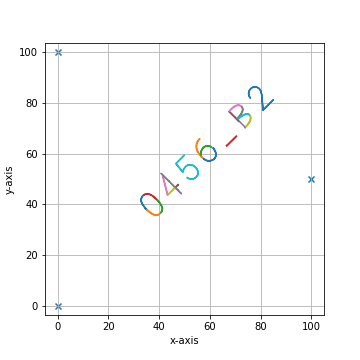
identifier_1 = tools.text("0456_B2", offset=np.array([30, 40]), rotation=-np.pi / 4)
my_first_collection.join(identifier_1)
my_first_collection.plot(calibration=True)